

OpenAI
GPT models · Codex
- Paid plans
- ChatGPT Plus and Pro
- In SwitchBoard
- Built-in ChatGPT sign-in is planned. An OpenAI API key enables separately billed GPT requests.
 SwitchBoard
 0.3.3 for Mac · Native swarm workspace
Put the AI subscriptions you already pay for to work together. Assemble parallel specialist swarms in Studio, supervise handoffs from the Mac notch tray, and coordinate models and coding agents from one local gateway.
Inside the macOS app · 0.3.3
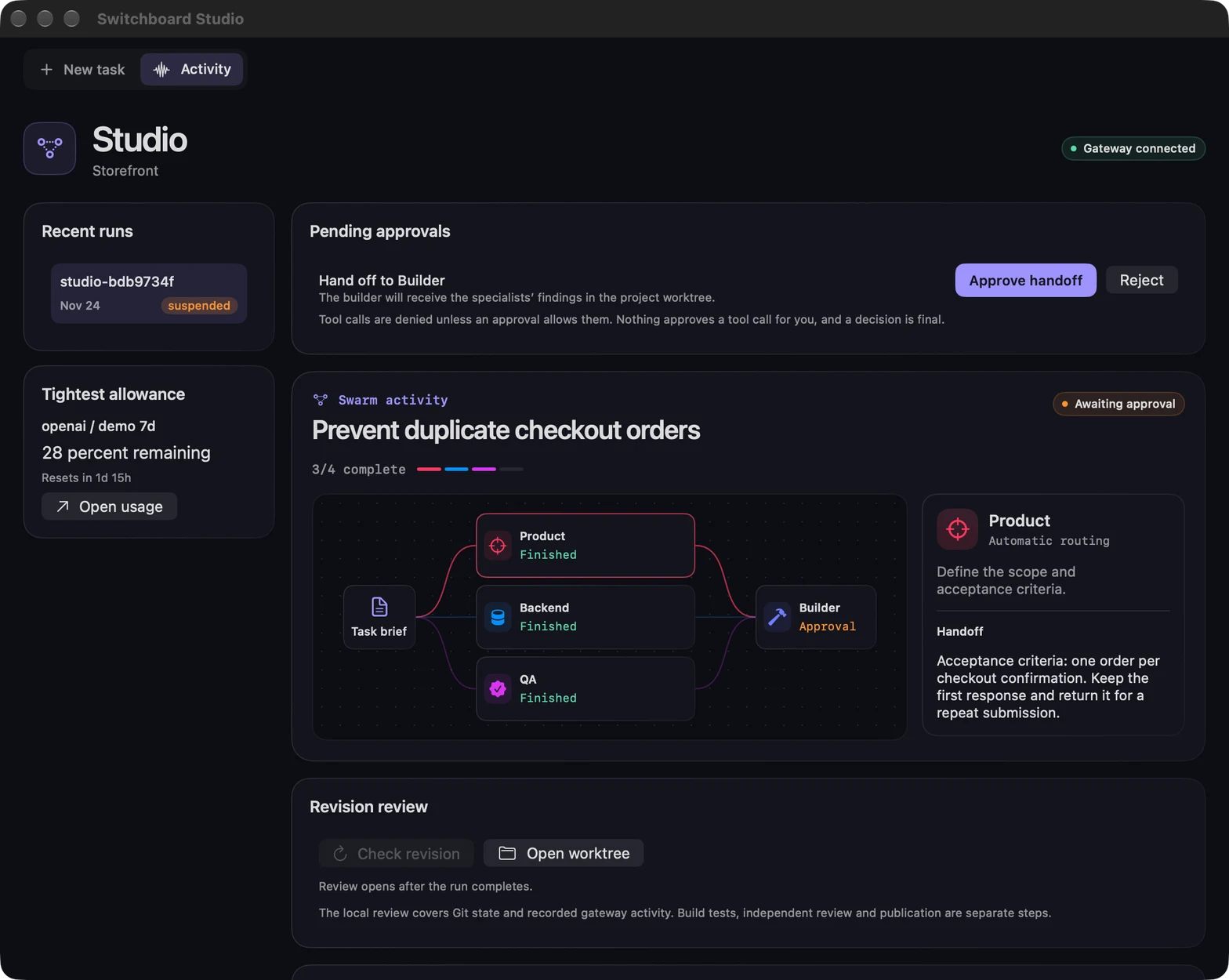
Product, Backend, and QA finish concurrently in an isolated Git worktree and pause at a supervised Builder handoff.
Model routing & receipts
Point your tools at one loopback gateway (127.0.0.1:8420). Preview the exact route before a Studio task dispatches, scope overrides per project or specialist role, and inspect recorded gateway receipts after every run.
Subscription usage
Check how much of your allowance is left before you hand work to an agent. If Claude has room before its next reset, you can give a code review to your signed-in Claude agent and save another model for the build.
How is this different from OpenRouter? OpenRouter brings many models behind one API. On its pay-as-you-go plans, calls to paid models use credits. A direct provider API key typically bills by usage, too. With SwitchBoard, a supported coding agent can use the allowance included in the subscription you already pay for. You choose when to use a separately billed API route. OpenRouter pricing
Live allowance readings are available from Claude Code. The five-plan comparison shows sample data.
84% used
 Grok
72%
 Claude
37%
ChatGPT
84%
 Gemini
48%
 Muse
19%
SwitchBoard Studio · 0.3.3
Assign Product, Backend, and QA specialists in parallel. Review their findings from Studio or the Mac notch tray before the Builder touches your worktree.
Live walkthrough · storefront
Studio links an isolated Git worktree, previews each role’s gateway route before dispatch, and runs Product, Backend, and QA in parallel.
Product  acceptance criteria: one order per confirmation
Backend  idempotency key contract & service guard
QA       duplicate-submit regression check (grok-review)
3/4 assignments finished · handoff ready
Product roadmap
Our ambition is to build the first AI subscription orchestrator for the whole product lifecycle. We’re extending the local coding workspace into a place to build, launch, and operate a product with the same agent team.
Start with a customer problem or an existing repo. The planned builder will turn it into a spec, a tested change, and a shareable preview you can approve for release.
Link an issue to its run, review a proposed change in your team’s chat, and record the decision back on the project.
Schedule a checkout check on a cloud runner. Give it a weekly budget and have it bring a failed test and its trace back to you, even when your Mac is closed.
Subscriptions and models
Find your paid plans, see which models they include, and choose who handles planning, coding, and review. With a supported coding adapter, you sign in with the provider and use the plan attached to that account.
GPT models · Codex
Sonnet · Opus · Haiku
Gemini Pro · Flash
xAI · Grok models
Meta · Muse

Moonshot AI · Kimi models

Alibaba Cloud · Qwen models

On-device models

NVIDIA-hosted models

Multi-provider model catalog
Local Mac release · v0.3.3
Install the self-contained Apple Silicon app bundle with the loopback AI gateway, bundled Studio runtime, camera-notch tray, and local SQLite ledger.
Includes Switchboard.app, loopback gateway (127.0.0.1:8420), bundled Node 22.23.5 & Git 2.56.1 Studio runtime, native notch tray, and WidgetKit extension.
d2da5123619fda34d9a75f63914b089f3a01edab4f17ccc9fdacb54e3d600ae7
Preview build (f49d929). Ad-hoc signed and not yet Apple-notarized — drag Switchboard.app to Applications, then Control-click → Open on first launch.
Local gateway routing, Keychain secret storage, Studio worktrees, and allowance tracking run on your Mac without checkout. AI provider subscriptions and API usage remain billed directly by each provider.
sbk-… keys